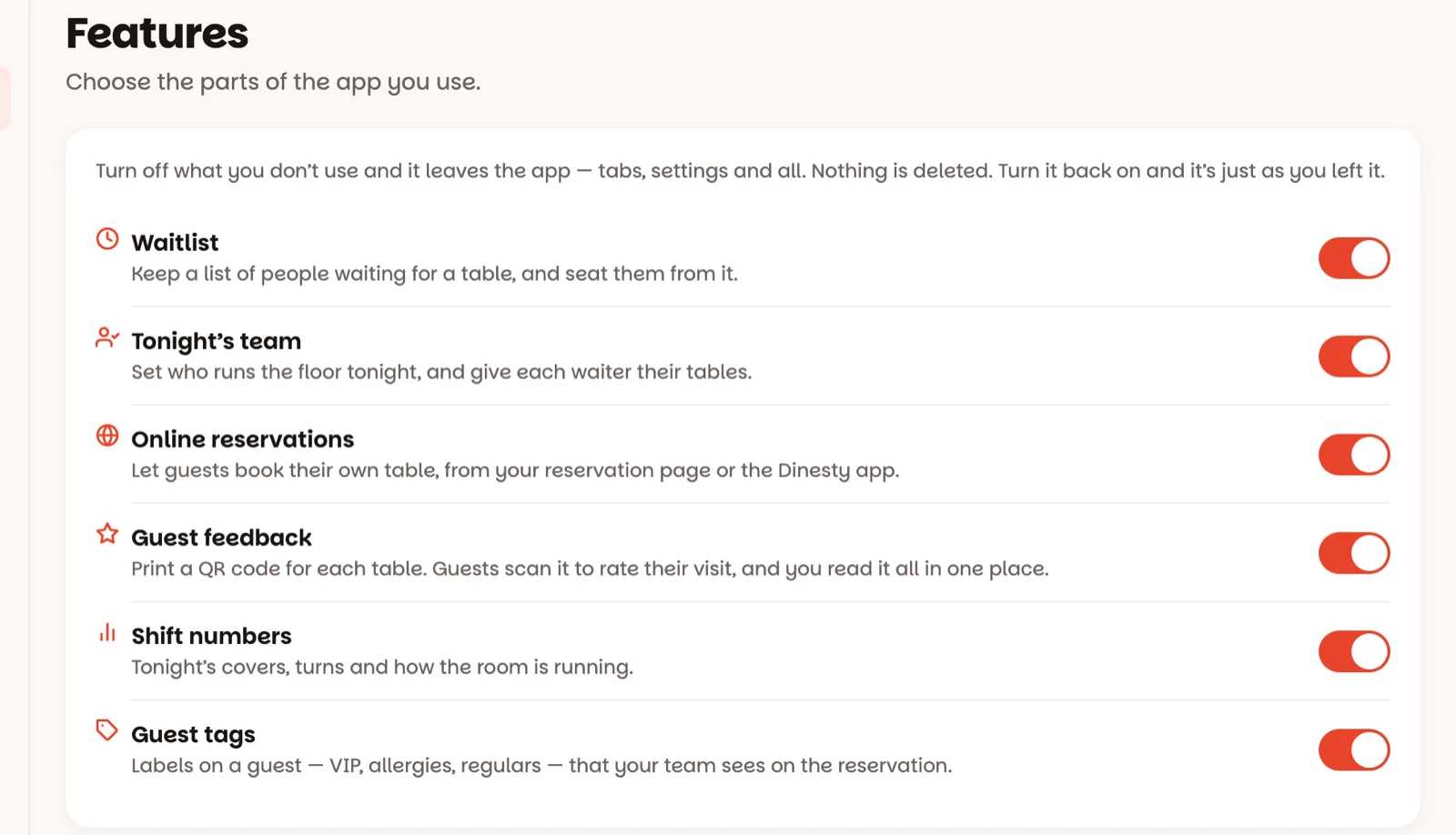
Don't run a waitlist? Don't want the team screens? Turn off what you don't use and it leaves the app.
1 minOwners only
In short
Settings ▸ Features → flip the switch. It saves at once.
1
Open Settings, then Features
One switch for each part of the app you might not need:
Waitlist — the Wait screen and waiting parties on the floor.
Tonight’s team — managers on duty, waiters and their tables.
Online reservations — reservations guests make themselves.
Guest feedback — the QR cards on your tables, and the Feedback screen (set it up).
Shift numbers — the Shift screen.
Guest tags — VIP, Regular and the other labels on guests.
Flip a switch and it saves straight away — a green tick says so. The app changes on every device: switch off Waitlist and the Wait button disappears for everyone.
Nothing is deleted. Switch a part back on and it's exactly as you left it.
Good to know
Only owners see this screen.
Guest feedback needs your restaurant's web address first — the switch tells you, with a link to set it.
A switch that's greyed out with a lock says Not available for your restaurant — that one is set by Dinesty. Ask Dinesty if you'd like it.
Waitlist here is for "we don't run a waitlist at all". To stop taking names for one busy night, use Accept waitlist in Reservation rules instead.